Search for a free resume builder and you'll find dozens of tools that all promise the same thing: a polished resume in minutes, at no cost. The catch is that "free" often stops at the download button. You spend twenty minutes filling in your details, click Download, and hit a paywall.
This guide compares the free resume builders worth your time, with a focus on the things that actually matter: whether you can download your resume as a PDF without paying, whether the layout works with applicant tracking systems (ATS), and how much help you get writing the content itself.
What to Look For in a Free Resume Builder
Before comparing tools, here is a checklist that separates a genuinely free builder from a trial in disguise:
- Free PDF download. This is the big one. If you can't export your finished resume without paying, it isn't free.
- No watermark. A logo stamped across your resume makes it unusable for applications.
- ATS-friendly layouts. Many companies run resumes through software before a human sees them. Clean, single-column layouts with standard headings parse far more reliably than heavily designed templates.
- Writing help. Suggestions for bullet points and summaries save time, especially if you're unsure how to describe your work.
- No forced sign-up wall. The best tools let you start building before asking for an account.
1. Humbot Resume Builder — Best Free All-in-One Option
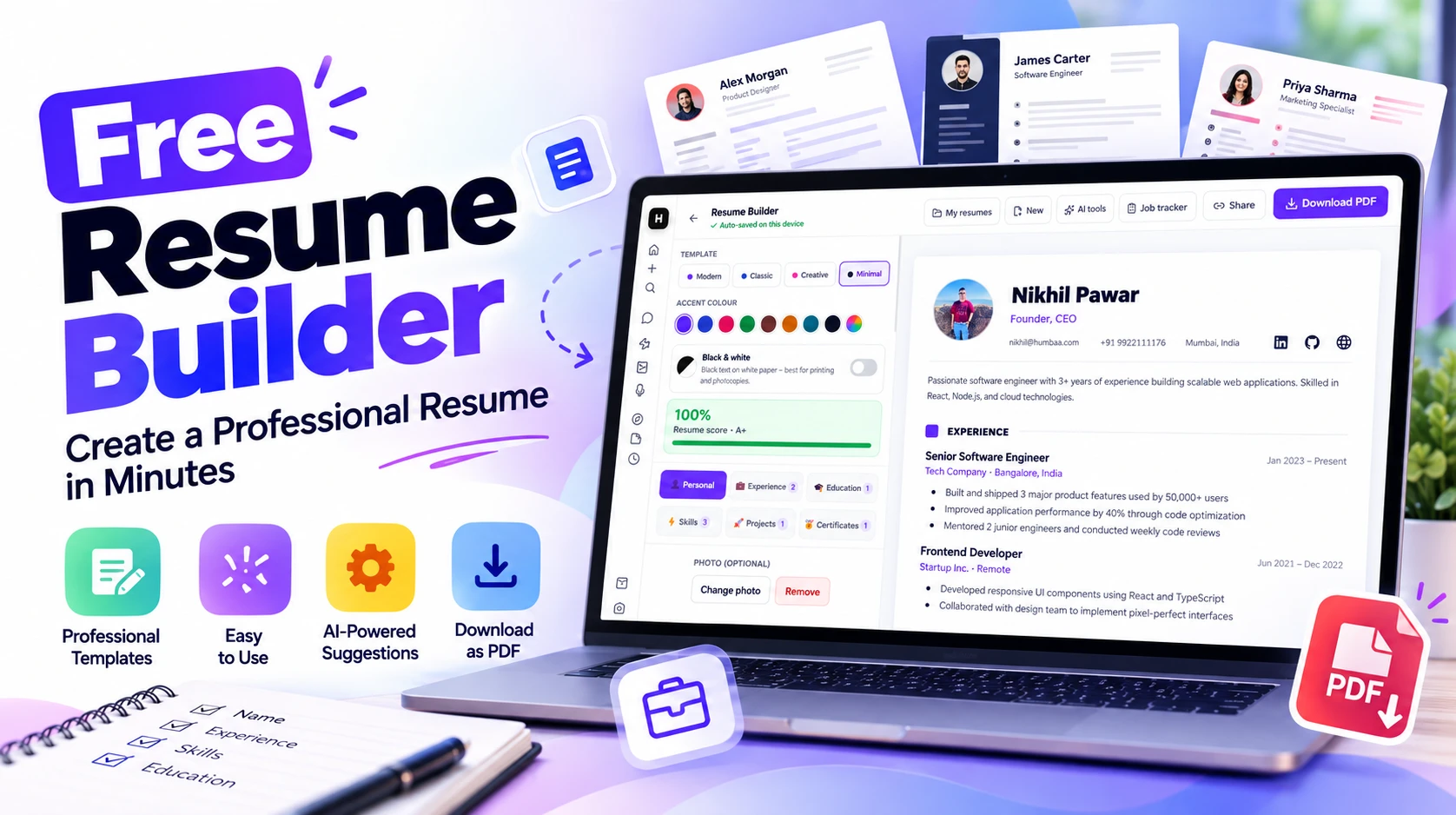
Humbot's Resume Builder is a free builder from the team behind Humbaa, designed to take you from a blank page to a finished PDF without a paywall in between. Your work is auto-saved on your device as you type, so you can close the tab and come back without losing anything.
What it offers:
- Four template styles: Modern, Classic, Creative, and Minimal
- Accent colour options, plus a black and white mode that prints cleanly on plain paper and photocopies
- A live resume score that shows how complete your resume is and where to improve
- AI-powered suggestions to help you write stronger summaries and bullet points
- Sections for personal details, experience, education, skills, projects, and certificates
- An optional profile photo you can add or remove at any time
- A built-in job tracker and a share option
- One-click PDF download
Best for: Anyone who wants a complete, free tool: building, scoring, polishing, and downloading in one place.
Try it: humbot.one/resume
Disclosure: Humbot is built by the same team that runs Humbaa. We've placed it first because it's our own product, and we've kept the rest of this comparison to what each tool publicly offers.
2. Teal — Best for Job Search Tracking
Teal offers unlimited resumes, ATS-friendly templates, and PDF downloads without a paywall. It also includes basic AI text tools and job application tracking on the free plan, which makes it a good fit if you are applying to many roles and want to keep everything organised in one dashboard.
Best for: Active job seekers managing many applications.
3. FlowCV — Best for Layout Control
FlowCV gives you your first resume free, with unlimited watermark-free PDF downloads. Its main strength is flexibility: you get detailed control over spacing, sections, and layout, which helps if you want a resume that looks distinctive without being cluttered.
Best for: People who want to fine-tune the design of a single resume.
4. Canva — Best for Creative Roles
Canva's resume maker has hundreds of designer templates and a drag-and-drop editor, with exports to PDF, JPG, or PNG. It's a strong choice for designers, marketers, and anyone in a creative field where visual presentation matters.
One caution: highly designed templates with columns, icons, and graphics can be harder for ATS software to read. If you're applying through online portals, keep a plainer version on hand as well.
Best for: Creative portfolios and roles where design counts.
5. Adobe Express — Best for Quick, Clean Templates
Adobe Express offers free ATS-optimised templates, custom branding options, and easy sharing, with no credit card required. It's a quick route to a tidy, professional-looking resume if you'd rather start from a template than a blank page.
Best for: Fast, no-fuss resumes from clean templates.
6. Resume.com — Best for Samples and Guidance
Resume.com offers a free builder with 100+ resume samples and AI-powered writing assistance. The sample library is useful if you're not sure how to phrase your experience for a particular industry.
Best for: First-time resume writers who want examples to learn from.
7. Resume Now — Free to Try, Watch the Upgrade Step
Resume Now lets you try its AI resume builder for free and download in plain-text (TXT) format. Premium templates and PDF downloads sit behind an upgrade, so treat it as a trial rather than a fully free option.
Best for: A quick plain-text version, if you don't mind upgrading for other formats.
Quick Comparison
| Tool | Free PDF download | Standout feature |
|---|
| Humbot Resume Builder | Yes | Resume score, AI suggestions, job tracker |
| Teal | Yes | Job application tracking |
| FlowCV | Yes (first resume) | Full layout control |
| Canva | Yes | Designer templates |
| Adobe Express | Yes | ATS-optimised templates |
| Resume.com | Yes | 100+ resume samples |
| Resume Now | Plain text only | Upgrade needed for premium formats |
Free plans and limits change often, so check each tool's current terms before you build.
Tips to Make Any Resume Stronger
- Lead with results, not duties. "Improved page load time by 40%" beats "Responsible for website performance."
- Tailor it for each role. Mirror keywords from the job description where they honestly apply to you.
- Keep the layout simple. Standard headings such as Experience, Education, and Skills help ATS software read your resume correctly.
- Keep it to one page unless you have many years of relevant experience.
- Proofread, then proofread again. Typos remain one of the most common reasons resumes get passed over.
- Save a PDF copy. A PDF preserves your formatting on any device.
The Bottom Line
If you want everything in one place, a free builder, a score that shows what to fix, AI writing help, and a PDF download with no paywall, start with Humbot Resume Builder. If you need extra design control or job tracking, FlowCV, Teal, and Canva are all solid free options too.
Looking for more tools to boost your job search or productivity? Browse the full Humbaa AI tools directory.